
Quick answer
We do not have a verified Steam store link for this specific Playgama edition. You can play the browser game here or on Playgama. Check a developer-linked store page before treating a similarly named result as the same game.
Is There a Verified Steam Listing?
Our source review did not establish a matching Steam app page for the Playgama game featured here. That is a statement about the evidence available to this guide, not proof that a Steam edition could never exist or that future store availability cannot change.
Without a verified listing, this page does not supply a Steam app ID, release date, wishlist button, price or installation link. Those details must come from the actual store page or a reliable link published by the identified developer.
Search results can include unrelated games, music and similarly named projects. A matching phrase in a title is not enough. Compare the developer and recognizable gameplay before following advice written for a different product.
What You Can Play in a Browser
The Playgama edition is a browser game. On this site, its player is embedded from Playgama rather than installed as a desktop application. Your desktop browser loads the game and sends movement and mouse input to that player.
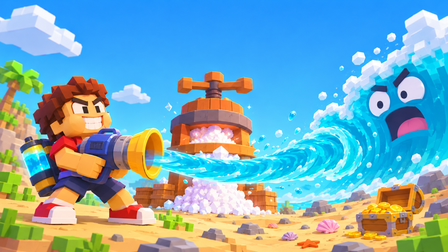
Its recognizable loop is collecting seawater, using the PRESS to obtain salt and spending salt at the blue SHOP. Playgama lists keyboard and mouse controls plus mobile support. This is the edition covered by our beginner, controls and salt guides.
A browser game is still played on a computer, but that does not make it a Steam release. Similarly, the presence of a fullscreen button does not imply an installer, offline mode, Steam achievements or cloud saves.
How to Check a Steam Result
If you find a candidate listing, inspect its own store information instead of relying on a search snippet. Use a developer’s official link when one is available, and compare several identifying details.
- 01
Check the destination
Open the actual Steam store page. A download page on an unrelated site is not a Steam listing.
- 02
Compare the developer
Check the developer and publisher against official information for the edition you want. A similar name alone does not establish a connection.
- 03
Compare the game loop
Look for the same screenshots and mechanics. The Playgama edition uses the PRESS-and-salt loop; a different economy may indicate another game.
- 04
Use only confirmed store features
Read the listing for platforms, availability and save support. Do not infer those features from the browser game or from another provider’s description.
| Signal | What it establishes |
|---|---|
| Matching title only | A candidate to investigate, not an identity match |
| Developer-linked store URL | A stronger connection to the identified project |
| Same screenshots and mechanics | Useful supporting evidence about the edition |
| A Steam app ID on an unrelated download site | Not sufficient to verify the release |
Do Not Confuse Playgama and Mana
Mana also hosts a game named Drink the Ocean. Its official page describes collecting seabed treasure, selling it to a merchant and buying stronger straws, with desktop co-op play. That description differs from the Playgama PRESS-and-salt loop.
A link or announcement concerning Mana’s game should not automatically be treated as a Steam announcement for Pinidi Studio’s Playgama edition. Our provider comparison keeps those details separate and links directly to both sources.
If You Just Want to Start Playing
Use the Play link to open the known browser player. No installer is required for the version embedded here. If it stays blank or ignores input, the loading guide explains connection, focus and provider-page checks without directing you to a replacement executable.
For Drink the Ocean Steam searches, the useful distinction is availability versus verification: this guide can point to the identified browser game, while a Steam claim needs its own matching evidence. Save transfer between providers or platforms should also be checked rather than assumed.
Frequently Asked Questions
01Is Drink the Ocean definitely unavailable on Steam?
This guide does not make that categorical claim. We have not established a verified store listing for the specific Playgama edition featured here.
02Can I download the browser game from this site?
This site provides an embedded browser player and guides, not a game installer or downloadable executable.
03Can I wishlist it using an app ID from another site?
First verify the actual Steam store page and its developer connection. We do not provide an unverified app ID or wishlist link.
04Are browser saves linked to Steam?
No save-transfer connection has been verified for the game featured here. Do not assume that a similarly named product will recognize your browser progress.
Sources & game credits
Gameplay descriptions refer to the linked provider. Game artwork belongs to its respective rights holders.